IntegratedProfiles is now open source!
IntegratedProfiles, a new MediaWiki extension that adds modern, customizable, and extensible user profiles, is now open source on GitHub!
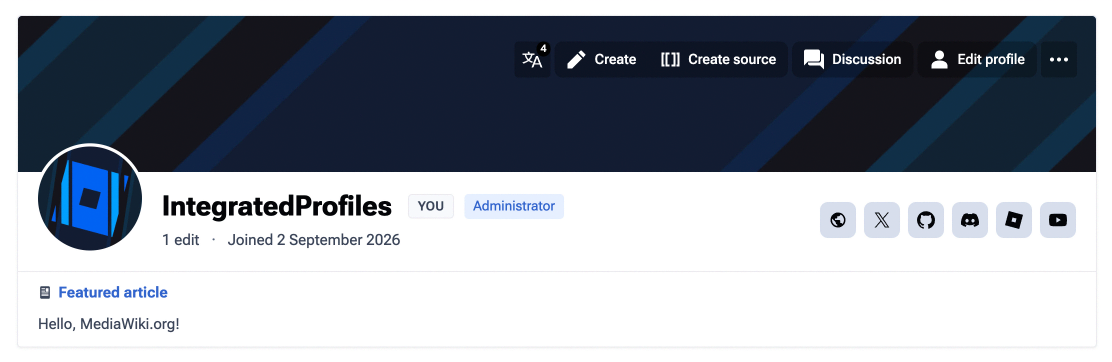
I previously announced this new extension as User Profiles Support on the Obby Wiki as an exclusive extension. Now, today, it is open source and free to use yourself. You can install the latest version (v0.3.0) right now on MediaWiki 1.46, with support for earlier versions (such as MediaWiki 1.45) coming shortly.
Star it now on GitHub!
 obbywiki/mediawiki-extensions-IntegratedProfilesBETA | Implements modern user profiles with the ability for other extensions to build on it.21GPL-3.0
What I really like about this extension (and what's kind of half its name) is its focus on being integrable, allowing other extensions to build on top of it easily, instead of fighting for compatibility. Via hooks and APIs, other extensions have access to do the following:
- Fetch user avatars (single or batch)
- Register their own tabs (next to About, Contributions, etc.)
- Modify extension HTML
This allows for a lot of different opportunities! The first extension to build on this is UserFlairs, an extension that adds Discourse-styled flairs to users' profiles.
obbywiki/mediawiki-extensions-UserFlairsAdds configurable flairs for MediaWiki user groups, similar to Discourse.00
You can check that out separately as well, as it's also on GitHub.
Integrations Demo
If you're interested in developing an extension that integrates into IntegratedProfiles, read below. Instead, if you're looking to install it, then you can read the documentation on Extension:IntegratedProfiles:, or skip to the #Configurations part.
UserFlairs
As mentioned before, UserFlairs is a MediaWiki extension that's already out and usable today! This extension uses the IntegratedProfilesAfterAvatar to add a user's flair as a badge on top of a user's avatar (PFP).
obbywiki/mediawiki-extensions-UserFlairsAdds configurable flairs for MediaWiki user groups, similar to Discourse.00
This is already in use on the Obby Wiki to give a small Obby Wiki logo to administrators and bureaucrats. There's a screenshot below, but you can also see this live on my user profile at User:Wlft:.
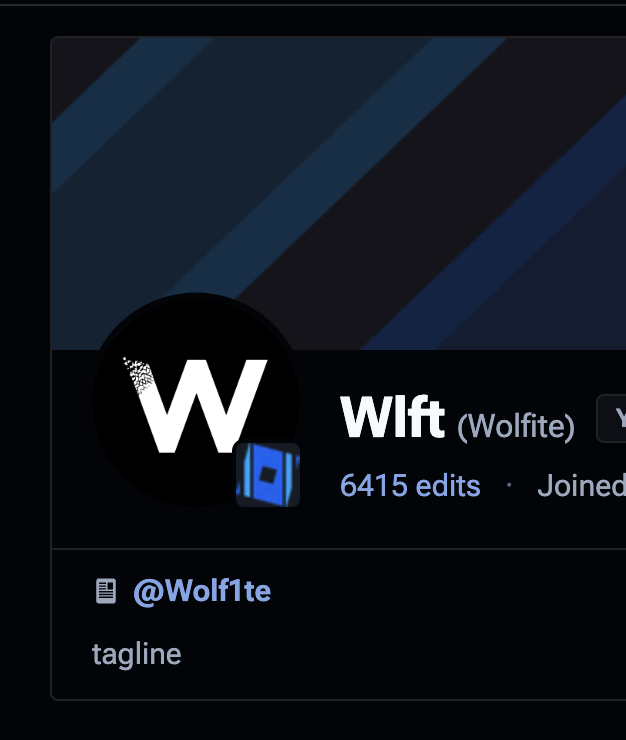
This extension also supports Extension:UserProfileV2:, but is pretty JS heavy. Additionally, more support exists for IntegratedProfiles.
As I said before, UserFlairs uses the IntegratedProfilesAfterAvatar hook to add the flair to the user's profile cleanly. Here's a sample from that codebase on how that's used:
public function onIntegratedProfilesAfterAvatar( array $profile, string &$html ): void { if ( !$this->is_enabled() ) { return; }
if ( !empty( $profile['is_private'] ) ) { return; }
$user = $this->user_from_profile( $profile ); if ( $user === null ) { return; }
$this->append_flair( $user, $html, FlairHtml::MODE_IN_AVATAR, false );}You can see the code above checks if the feature is enabled, then gets $profile from the hook and first checks if the profile is private and that the user exists, then it invokes append_flair, passing $html from the hook.
private function append_flair( UserIdentity $user, string &$html, string $mode, bool $needs_js ): void { $user_id = $user->getId(); if ( $this->placement->is_placed( $user_id ) ) { return; }
$flair = $this->resolver->resolve_for_user( $user ); if ( $flair === null ) { return; }
$html .= $this->flair_html->render( $flair, $mode ); $this->placement->mark( $user_id ); $this->add_overlay_modules( RequestContext::getMain()->getOutput(), $needs_js );}Here, you can see an example of HTML being appended (via PHP's .=) from IntegratedProfilesAfterAvatar.
flair_html is HTML constructed via MediaWiki\Html\Html within FlairHtml.php:
public function render( array $flair, string $mode = self::MODE_IN_AVATAR ): string { $classes = [ 'uf-flair' ]; if ( $mode === self::MODE_RELOCATABLE ) { $classes[] = 'uf-flair--relocatable'; }
$size = $this->file_lookup->get_size(); $label = (string)( $flair['label'] ?? $flair['group'] );
return Html::rawElement( 'span', [ 'class' => $classes, 'data-uf-group' => $flair['group'], 'style' => '--uf-flair-size:' . $size . 'px' ], Html::element( 'img', [ 'class' => 'uf-flair__image', 'src' => $flair['url'], 'width' => (int)$flair['width'], 'height' => (int)$flair['height'], 'alt' => $label ] ) );}The same logic could just as easily apply to IntegratedProfilesAfterMasthead, the hook that appends HTML after the profile masthead. And, if you couldn't tell, this hook (as well as the masthead terminology itself) is inspired by Extension:UserProfileV2:'s approach. You can use its hook as well.
I hope that's a good first example on how this extension can be integrated with, but, it's in no way the only. In fact, I believe the next way is much better, in my opinion.
Custom tabs
A big thing IntegratedProfiles does differently than other profile extensions (such as UPv2) is tabs. While I plan to add more, we currently have the About and Contributions tabs, which link to both the user's about page (just the regular User:Name: page), as well as Special:Contributions/Name. The design of the tabs are inspired by TabberNeue. See below:

That's okay to start, those are the two primary actions, after all. Maybe that and the user talk page. However, what I like the most (and the main reason I even developed the extension with this focus), is the ability for other extensions to register and render their own tabs!
I used this feature in two extension prototypes (which have now been scrapped); UserCollections and IntegratedAchievements. They both provided independent functionality, but when paired with IP, they registered their own tabs and content. IntegratedAchievements added the 'Achievements' tab to show all the achievements the user had earned, while UserCollections added the 'Collections' tab to show all the collections a user had created.
This is achieved (🥁) via two hooks; IntegratedProfilesGetTabs and IntegratedProfilesRenderTab, which can be used together to both register a new custom tab and also fill in the desired tab with HTML when active.
Example
Let's use IntegratedAchievements and see how it register tabs first with IntegratedProfilesGetTabs.
/** * Register Achievements tab on IntegratedProfiles. * * @param list<array{id?:string,label?:string,weight?:int}> &$tabs * @param array<string,mixed> $profile */public function onIntegratedProfilesGetTabs( array &$tabs, array $profile ): void { if ( !$this->config->get( 'IntegratedAchievementsEnabled' ) ) { return; }
$tabs[] = [ 'id' => 'achievements', 'label' => 'Achievements', 'weight' => 15
'id' => ProfileBadgeHtml::TAB_ID, 'label' => RequestContext::getMain()->msg( 'integratedachievements-tab-label' )->text(), 'weight' => ProfileBadgeHtml::TAB_WEIGHT, ];}I included a simplified version to get to the point, but there's also the original in red below it in case you wanted to see that too.
Anyway, as we can see here, we listen on the hook and mutate &$tabs by adding to the array. Here's the schema again if you're unsure:
[ 'id' => string, 'label' => string, 'weight' => int ]This registers the tab, so it'll appear on the tab strip (between About (20) and Contributions (20)) like so:

However, when we click it, there won't be any content! I don't know how useful an empty tab is to you, but for me, it's nothing to get excited over. I think?
Anyway, to get an actual tab working, you'll need to use the IntegratedProfilesRenderTab hook, the hook actually responsible for the HTML behind your tab.
Here's another excerpt from Hooks.php in IntegratedAchievements (again, with simplifications made):
/** * Render Achievements tab panel for IntegratedProfiles. * * @param array<string,mixed> $profile */public function onIntegratedProfilesRenderTab( string $tab_id, string &$html, array $profile, IContextSource $context ): void { if ( !$this->config->get( 'IntegratedAchievementsEnabled' ) || $tab_id !== 'achievements' ) { return; }
$user_id = (int)( $profile['user_id'] ?? 0 ); if ( $user_id <= 0 ) { return; }
$context->getOutput()->addModuleStyles( 'ext.IntegratedAchievements.styles' ); $html = $this->profile_badge_html->render_tab_panel( $user_id, $context );}There's a bit of cleanup I did, but mostly, yes, these are the real line numbers from the codebase.
Anyway, we can see $html being set to the html from IA's render tab function as well as custom styles being injected into the context.
I'm sorry if this isn't the best example, but hopefully you can get an idea of what's going on from this. Additionally, I'll be periodically updating the documentation on MediaWiki.org, so make sure to check that out too.
If you use these, I'd love to see them. Feel free to send them to me on Discord!
I'll go over a few configuration options, but you should read the up-to-date documentation either on the README or at Extension:IntegratedProfiles:, especially if you're reading this post after it's published.
 MediaWikiExtension:IntegratedProfiles - MediaWikiIntegratedProfiles is a MediaWiki (1.45+) extension that implements modern and customizable user profiles featuring custom avatars and banners, social links, taglines, and favorite article links. IntegratedProfiles is currently in beta, with many features being subject to change.
Configurations
$wgIntegratedProfilesEnabledSocialLinks
Use $wgIntegratedProfilesEnabledSocialLinks to customize the social links available to users for an individual wiki. The platforms that are currently supported are listed below. All of them are included as defaults, but that may change, so specify them yourself (if you want them) to be safe.
NOTEOn farms, all options are available globally and in the background. When one wiki enables a social link, every user that has that social link set already has it displayed on their local profile. Unfortunately, this does not allow wikis to introduce their own social links, as that would likely introduce conflicts.
- Website (a custom http/https URL)
- Twitter/X (username)
- GitHub (username)
- Discord (username)
- Roblox (username)
- YouTube (URL)
$wgIntegratedProfilesEnabledSocialLinks = [ 'website', 'twitter', 'github', 'discord', 'roblox', 'youtube' ];Alternatively, set none to disable the feature:
$wgIntegratedProfilesEnabledSocialLinks = [];You can request a platform by making an issue on GitHub so long as the platform you want meets these requirements:
- It is uncontroversial
- It is accessible to all users 16+ (preferably 13+)
- Any language, does not have to be global or mainstream
- It has a universal and usable logo that can be used in both black and white color icons
$wgIntegratedProfilesLanguageInterwikis
Use $wgIntegratedProfilesLanguageInterwikis to have IntegratedProfiles automatically inject language links into the page. This is useful for language interwikis, as users can quickly hop between a user's profiles on different language sites. Please ensure each language code set here is also registered in the interwiki table of each wiki (shown on Special:Interwiki:).
$wgIntegratedProfilesLanguageInterwikis = [ 'en', 'ko', 'ja', 'zh' ];By default, this feature is disabled. Users can still manually add languages to their user page regardless.
And that's it! Unlike the documentation pages, this post won't be updated, so check them out for more information.
obbywiki/mediawiki-extensions-IntegratedProfilesBETA | Implements modern user profiles with the ability for other extensions to build on it.21GPL-3.0